Blog post
WebMCP: Connect AI to Your Frontend, Not Just the Backend
MCP wires AI to the world beyond the browser. WebMCP wires it to the page itself: declared tools, live state, no glue code.
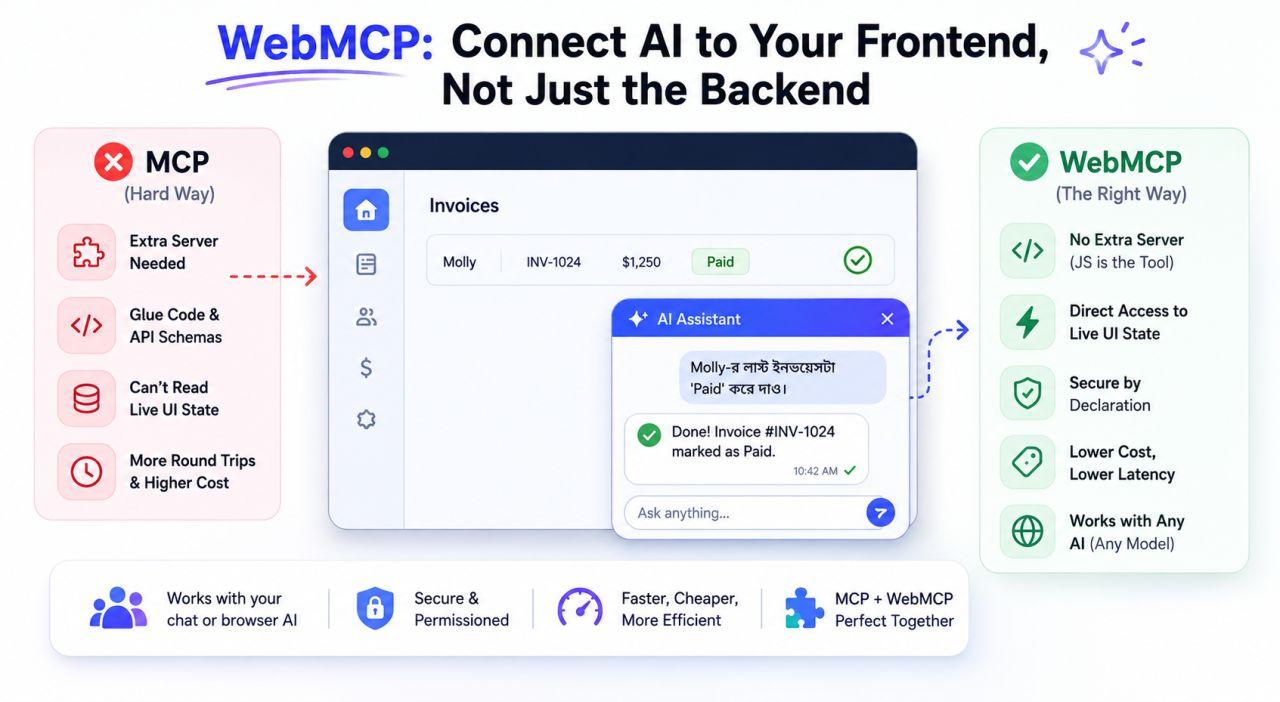
Say you are building an in-app AI chat widget for your SaaS. The user types into the chatbot, and the AI performs the app’s actions in the background. Say the user writes: “Mark Molly’s latest invoice as Paid.”
It seems easy at first: the widget is part of the app, the code is our own, how hard can it be? But the real jolt comes when you step into the actual architecture. The widget looks like a beautiful piece of UI, but technically it is an isolated boundary. It cannot read or write the main dashboard, the filter components, or the frontend’s current state on its own.
To see why the conventional MCP route gets painful, you first have to understand what MCP was built for. MCP was designed to connect AI to backend tools, databases, SaaS services, or desktop systems: the world outside the browser.
Now the problem. When your user says “close this ticket”, “this ticket” means the one currently open on screen. That information lives only in the frontend’s client-side state, activeTicketId. The MCP server cannot see that state by itself. So you end up writing piles of glue code to ship the current browser state to the server, and a separate endpoint plus JSON schema for every action. To handle a household task, you take a round trip to an outside server.
WebMCP fills exactly this gap. It is not a replacement for MCP; it is a complement. Server-side work stays with MCP, and the page’s live-state work goes to WebMCP. No separate server is needed: your existing client-side JavaScript itself becomes the tool, and the browser (the navigator.modelContext API) handles the conversation between the app and the agent.
Now the frontend app declares its official tools right in the browser. The app says: “this page has markAsPaid(invoiceId) and closeCurrentTicket() capabilities.” The advantage lands twice. First, the model in your in-app chat widget can execute that dashboard tool directly, with no extra glue code or custom API layer. Second, if the user does not use your chatbot and instead asks their browser’s own AI assistant (Chrome’s built-in AI, say), that agent sees the same declared tools and acts on them accurately. In other words, the frontend code is written once. Custom chatbot or third-party agent, everyone speaks to the app over the same standard protocol.
This is why WebMCP matters so much for the frontend. It is completely model-agnostic. Claude today, OpenAI tomorrow, offline Gemini Nano the day after: swap the model and not one line of frontend code changes. The page’s bulky HTML or data does not ship to the cloud as prompt after prompt; the model reads the declared tool list directly and works to the point, so the token bill drops noticeably. Security is clean too, because the app’s own declarations decide how much the AI can access. Without your permission there is simply no opening to read sensitive data or take wrong actions.